
App Introduction
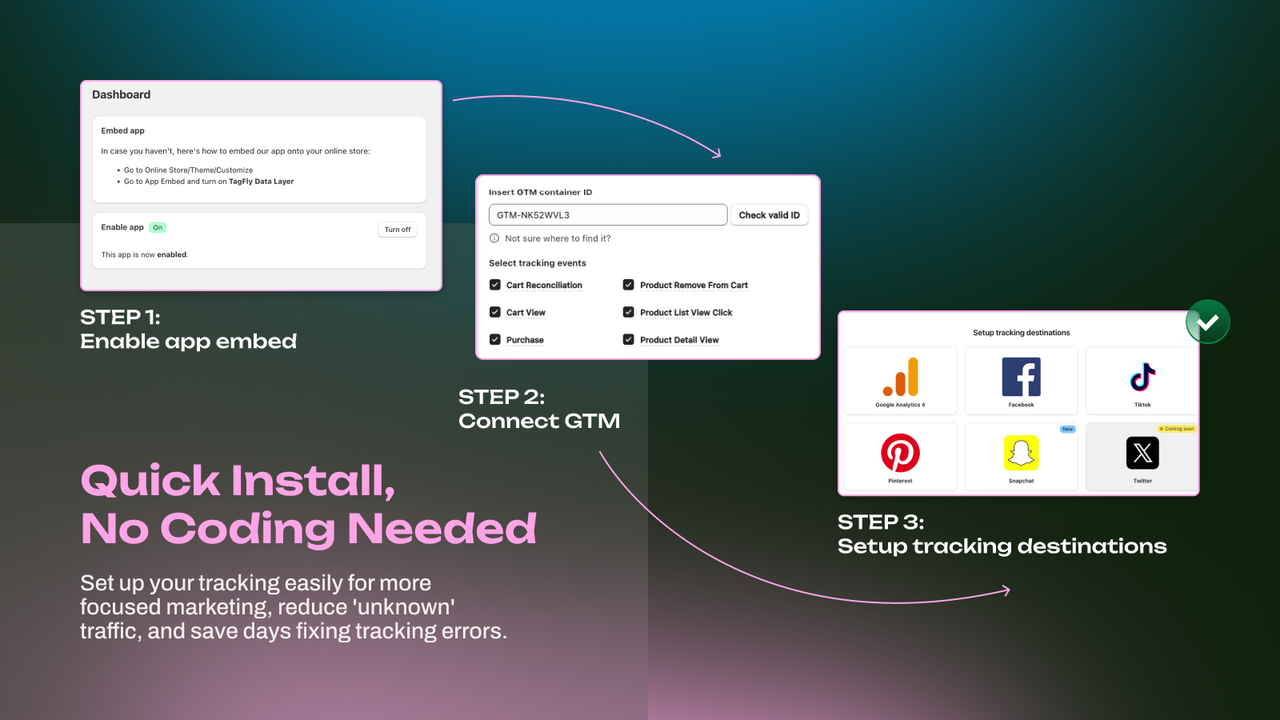
Server-side tracking & GTM for GA4, Google Ads, Facebook, and TikTok – Effortless Google Tag Setup Set up complete conversion tracking for Google Ads, GA4 (Google Analytics), and Facebook Ads in minutes with simple Google Tag Manager (GTM) configuration. Send accurate server-side tracking data directly to Facebook (Meta), TikTok, and Twitter (X) without slowing down your website. Get up and running quickly with pre-built GTM containers, and instantly access fully GDPR-compliant conversion tracking data. Say goodbye to guesswork and start seeing real conversion tracking with TagFly GTM and Google Ads.
Core Functionality
- Easily set up Google tags for accurate ad tracking in GA4, Google Ads, and Facebook
- Server-side tracking captures precise customer data while bypassing iOS restrictions
- Pre-built GTM containers ready for use with GA4, Facebook, Google Ads, TikTok, and Twitter
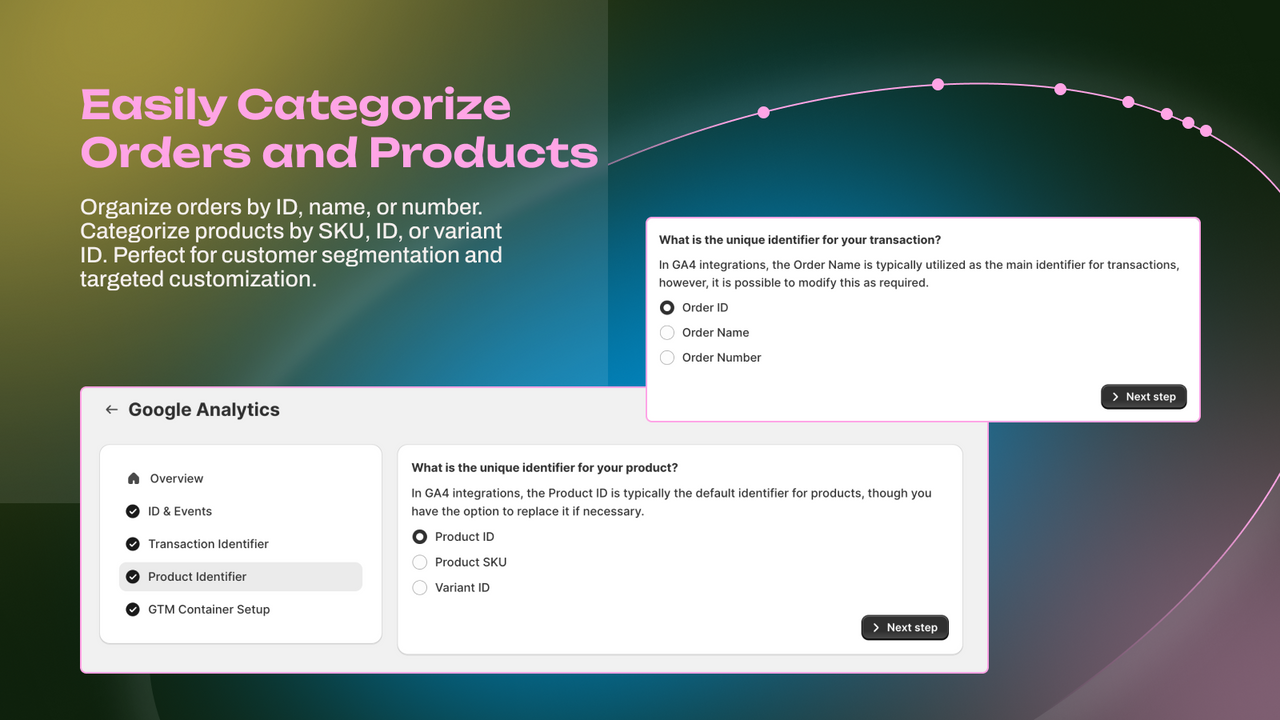
- Manage multiple channels and pixels in one place—no code required
- Easily comply with privacy regulations like GDPR and CCPA
Merchant-Friendly
- Independent Station Merchants
- Cross-border E-commerce Sellers
- Brand-owned E-commerce
- Small and Medium E-commerce Merchants
- Multi-channel Operators
Basic Information
- Developer:TagFly
- Address:18/11 Thai Ha, Ha Noi, 70000, VN
- Price: Free / Free plan
- Rating:4.8 / 5
- Comment Count:121 comment
- Release Date:2021-3-24
- Supported languages:English
- Compatible products:Shopify
Application Screenshot





Price Plan
Free to install
- Support 1 Tracking Channel
- 1 Pixel & 1 Server-Side Tracking
- Track 10 Purchase Events per Month
- GTM Integration
- 24/7 Real-Time Support
Basic
- Support multiple tracking channels
- 1 server-side tracking per channel
- Unlimited event tracking
- GTM integration
- 24/7 real-time support
Growth
- Support multiple tracking channels
- Unlimited pixel and server-side tracking
- Unlimited event tracking
- GTM integration
- 24/7 real-time support
User Location & Comments
User Location
Comments
Shopify API Used
- POST /admin/api/shop/metafields.json
- PUT /admin/api/shop/metafields/{id}.json
- GET /admin/api/shop/metafields.json
Permission:write_shop,read_shop,manage_metafields
- POST /admin/api/analytics/events.json
- PUT /admin/api/analytics/events/{id}.json
- GET /admin/api/analytics/events.json
Permission:write_analytics,read_analytics,manage_shop
- POST /admin/api/gtm_containers.json
- PUT /admin/api/gtm_containers/{id}.json
- GET /admin/api/gtm_containers.json
Permission:write_gtm,read_gtm,manage_shop
- POST /admin/api/channel_settings.json
- PUT /admin/api/channel_settings/{id}.json
- GET /admin/api/channel_settings.json
Permission:write_channels,read_channels,manage_shop
- POST /admin/api/privacy_consents.json
- PUT /admin/api/privacy_consents/{id}.json
- GET /admin/api/privacy_consents.json
Permission:write_privacy,read_privacy,manage_shop



