
App Introduction
Generate more email signups from your store visitors to enhance your email marketing lead generation strategy. POWR Email Signup is an easy way to build a powerful email list—critical for running a successful online business. It installs quickly on your store with no coding required, and fully customizes to match your personal brand. The captured emails can be used in multiple ways, such as drip marketing, newsletter signups, and blog subscriptions. Boost your lead generation and stay connected with customers and interested prospects.
Core Functionality
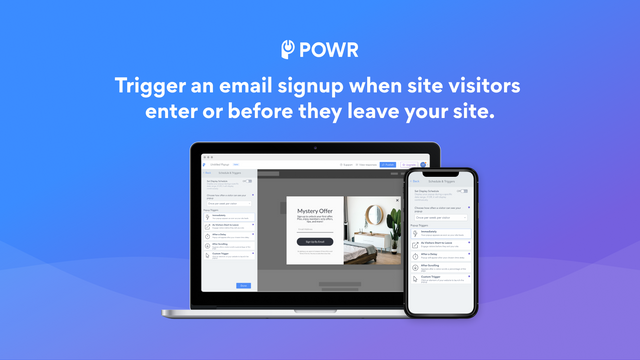
- Flexible display controls. Choose display frequency and select triggers.
- Set up auto-replies and instant email alerts for new submissions.
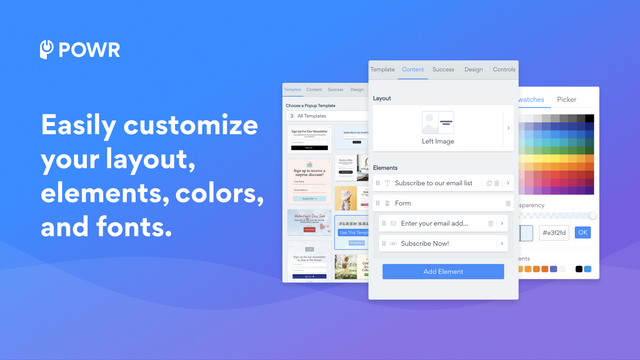
- Choose from a variety of pre-built templates and match them to your brand.
Merchant-Friendly
- Independent Station Merchants
- Small & Medium E-commerce Sellers
- Brand Store Operators
- Multi-channel Sellers
Basic Information
- Developer:POWR.io
- Address:44 Tehama Street, San Francisco, CA, 94105, US
- Price: Free / Free plan
- Rating:4.6 / 5
- Comment Count:10 comment
- Release Date:2017-10-27
- Supported languages:English
- Compatible products:Shopify
Application Screenshot











Price Plan
Free
免费
- Up to 5 elements
- 25 submissions per month
- Pre-built templates
- Responsive dashboard
- Basic analytics
- Enable coupon codes
- Undo/redo edits
- 24/7 email support
Starter
$6.04 / 或 $57.96/年(可节省 20%)
- All Free Features +
- Unlimited Elements
- Advanced Entry Animations
- Advanced Template Design
- Post-Submission Redirect
- Live Chat Support with POWR
Pro
$14.84 / 或 $142.44/年(可节省 20%)
- All Starter Features +
- 1,000 Submissions per Month
- File Upload
- Advanced Behavior Control
- Mailchimp Integration
- Zapier Integration
- Google Analytics, Tag Manager, Sheets
Business
$98.99 / 或 $950.28/年(可节省 20%)
- All Pro Features +
- Unlimited Submissions
- Private Access to Email Marketing Tool
- 10,000 Monthly Email Sends
- Premium Access to 60+ POWR Apps such as
- Form Builder
- Instagram Feed
- Store Locator Map
User Location & Comments
User Location
Comments
Shopify API Used
- POST /admin/api/display_settings.json
- PUT /admin/api/display_settings/{id}.json
- GET /admin/api/display_settings.json
Permission:write_display_settings,read_display_settings,manage_themes
- POST /admin/api/auto_responses.json
- PUT /admin/api/auto_responses/{id}.json
- GET /admin/api/auto_responses.json
Permission:write_auto_responses,read_auto_responses,manage_notifications
- POST /admin/api/template_selections.json
- PUT /admin/api/template_selections/{id}.json
- GET /admin/api/templates.json
Permission:write_template_selections,read_templates,manage_themes



