
App Introduction
Insert multiple scripts/codes in the header/footer, including Facebook Pixel, GA, TikTok Pixel, and Snapchat Pixel. CRO ‑ Insert Code is an excellent tool that lets you inject code into your Shopify store pages! You can add anything you want—including scripts, styles, custom CSS, Google Analytics, Facebook Pixel, and canonical tags. It’s incredibly easy to use: simply activate the app, enter any code (JavaScript, CSS styles, custom HTML) in the app’s form, click Save, and you’re done! This app simplifies the process of embedding code in headers and footers for everyone.
Core Functionality
- Add Google Analytics/Google Tag Manager/Facebook Pixel/Meta tag codes
- Insert HTML, CSS, Liquid, jQuery, and JavaScript
- Insert code into specific pages/products/collections
- Split code across various services for better management
Merchant-Friendly
- Independent Station Merchants
- Cross-border E-commerce Sellers
- Brand E-commerce
Basic Information
- Developer:SaleSpark
- Address:10900 Research Blvd Ste 160C Pmb 3043, Austin, TX, 78759, US
- Price: Free / Free plan
- Rating:4.5 / 5
- Comment Count:4 comment
- Release Date:2020-4-20
- Supported languages:English
- Compatible products:Shopify
Application Screenshot



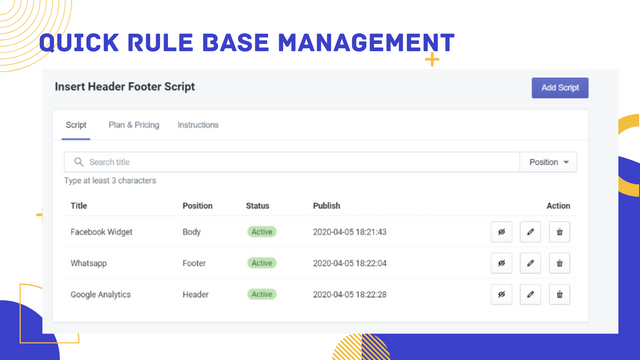













Price Plan
Basic Plan
- Insert code into <head>, <body> or </body>
- Insert JS/CSS/Liquid code
- Include or exclude code on specific pages, products, or collections
Yearly Plan
User Location & Comments
User Location
Comments
Shopify API Used
- POST /admin/api/script_tags.json
- PUT /admin/api/script_tags/{id}.json
- GET /admin/api/script_tags.json
Permission:write_script_tags,read_script_tags,manage_theme
- POST /admin/api/script_tags.json
- PUT /admin/api/script_tags/{id}.json
- GET /admin/api/script_tags.json
Permission:write_script_tags,read_script_tags,manage_theme
- POST /admin/api/script_tags.json
- PUT /admin/api/script_tags/{id}.json
- GET /admin/api/script_tags.json
Permission:write_script_tags,read_script_tags,manage_products
- POST /admin/api/script_tags.json
- PUT /admin/api/script_tags/{id}.json
- GET /admin/api/script_tags.json
Permission:write_script_tags,read_script_tags,manage_theme